Hover the notch

Your Xcode agent,
in the notch.
Xcode’s coding agent works in a pane you keep closed. Perch puts what it is doing in the one piece of screen you are always looking at. Claude or Codex — whichever you use.
Needs a Mac with a notch, macOS 14 or later. Free, MIT licensed. · Version 0.0.5 · 6 September 2026
Idle, it shows nothing
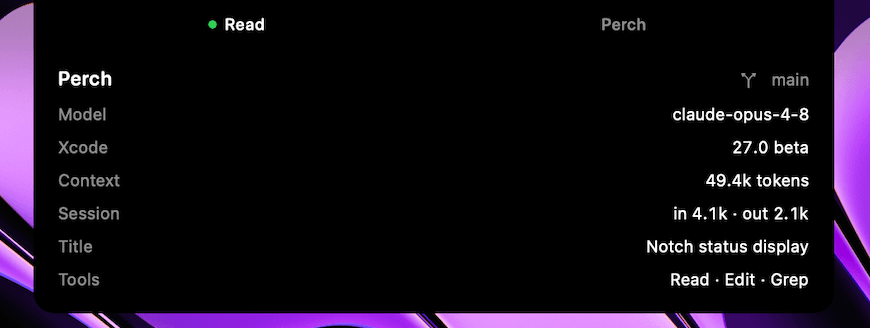
The notch goes back to being a notch. The moment the agent starts working, two hairlines frame it — the running tool on the left, the project on the right. Hover, and the panel unfolds.
NEW IN 0.0.5
Your Codex quota, at a glance
See how much of your Codex quota is used and how long until its reported reset, right beside your context and session totals. Perch shows the most consumed quota window and rounds the percentage up.
A reading of 84% · 2 d means 84% used, with the reported reset about two days away. The row appears when Codex provides quota data; sessions without it, including Claude sessions, keep the panel as it was.
Available in all 11 interface languages. Already using Perch? Quit it, replace the app in Applications with the latest download, then relaunch.
Read the 0.0.5 release notesNew to the Xcode agent?
Xcode 26 and later ship with a coding agent built in — Claude or Codex, your choice. You describe what you want, it edits your project, runs builds and reads your files. It works in a side pane you close as soon as you go back to your code.
Perch does not write anything and does not replace that pane. It only tells you what the agent is up to right now — which tool is running, on which project, how much context is in use — without switching windows.
Open the agent in Xcode once, then install Perch. It has nothing to read until the agent has run. Perch follows whichever of the two wrote most recently — there is nothing to configure.
It watches, and that is all
- Never writes. Transcripts are opened read-only. Nothing is ever written into the agent’s folder.
- Never reads your code. Only counters, names and timestamps are decoded. Message text, tool arguments and results are not parsed at all.
- Never phones home. No network connection, no analytics, no file on disk. State lives in memory and dies with the app.
You do not have to take our word for it — the whole thing is readable on GitHub.